> For the complete documentation index, see [llms.txt](https://docs.artar.es/project-creation/llms.txt). Markdown versions of documentation pages are available by appending `.md` to page URLs; this page is available as [Markdown](https://docs.artar.es/project-creation/scene-properties-and-values.-login-button.-fixed-2d-buttons..md).
# Scene properties and values. "Login" button. Fixed 2D buttons.
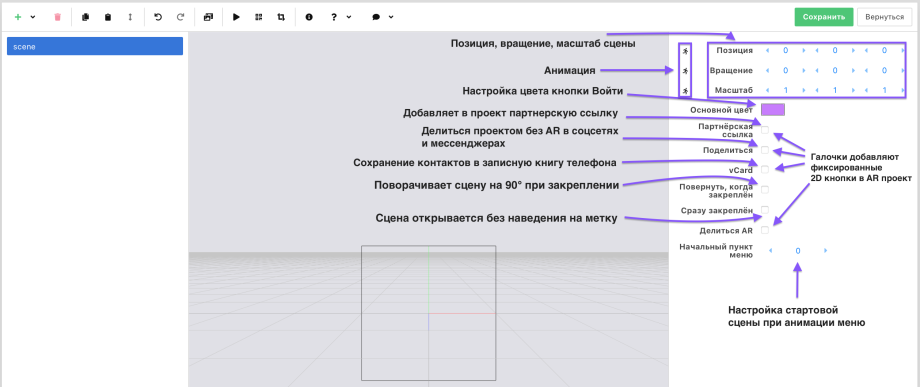
**A scene is the root element.** \
Changing the properties affects all objects in the scene.\
It is not recommended to significantly change the Position, Rotation, and Scale values.\
As a rule, it's also better to assign animation to objects nested in the scene.\
If you need to configure several objects, use a group element (group) and nest the other objects in it.
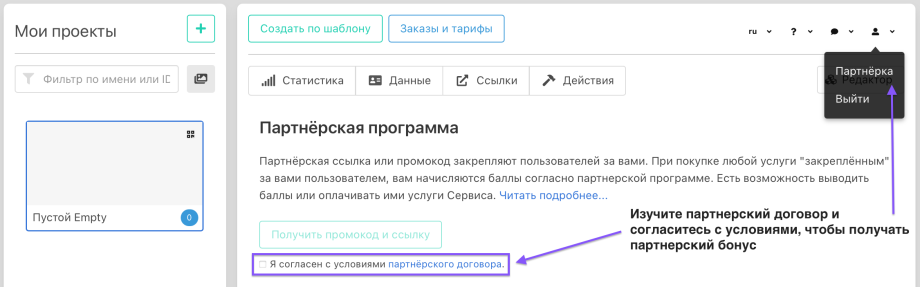
Learn about the affiliate program at [the link](https://artar.es/referrals). Agree to the terms in your personal account.\
Now the checkbox placed in the project next to the affiliate link will automatically add the registration link to your project and anyone who opens the project will be able to follow your link and register in the AR constructor.
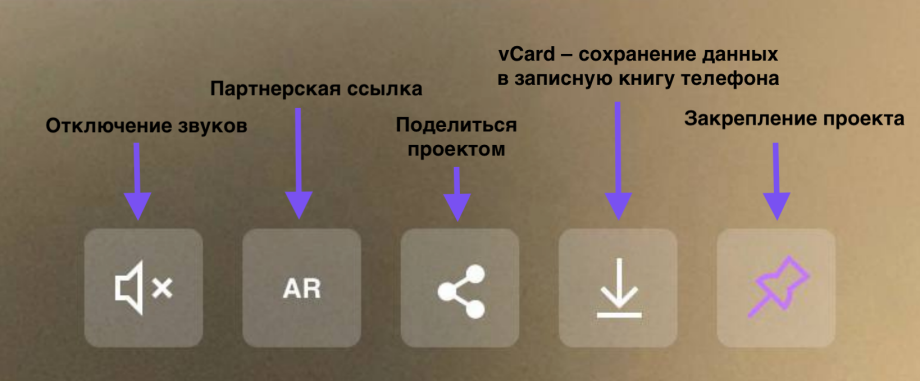
This is what fixed 2D buttons look like on a phone.
"Share AR" works only if you check both "Share" and "Share AR".\
"Share" allows sharing a link to the project without augmented reality.\
"Share AR" will send a link that opens the camera in the browser. Then you will need to point the camera at the corresponding marker-image or at any QR code (if the image is not set as a marker).